
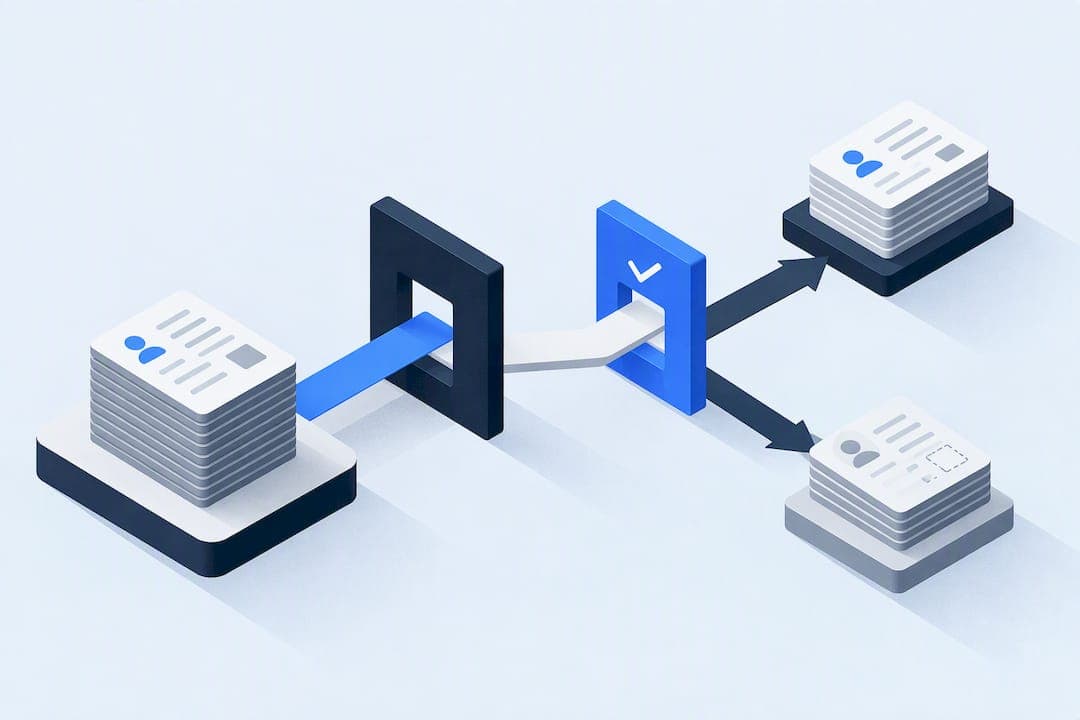
Lead data enrichment means filling gaps in a contact record (phone, title, company size, tech stack, buying signals) so sales and marketing teams can reach the right person with the right message. Outbound and RevOps teams benefit most. Before choosing a tool or process, run a match-rate pilot on 500 representative rows and measure what comes back verified, not just what gets appended.
TL;DR:
- Running a match-rate pilot on a representative sample is essential to verify accuracy and cost-effectiveness before large-scale enrichment.
- Waterfall and agent-led methods are better suited for ongoing pipelines, whereas batch enrichment works for static, campaign-specific lists.
- Verifying email addresses through SMTP checks at the point of enrichment reduces bounce rates and enhances deliverability across campaigns.
- Most corporate data starts with poor quality, making validation and continuous updating crucial to maintain outreach reliability.
- A managed, end-to-end enrichment service often exceeds point solutions in cost-efficiency and operational simplicity when teams lack dedicated RevOps support.
Table of Contents
- What lead data enrichment actually fills in
- Why enrichment matters: measurable impact and realistic KPIs
- Enrichment architectures and methods: batch, waterfall, and agent-led
- Key evaluation criteria: how to test enrichment tools before you buy
- Implementation steps: pilot, integrate, and operationalize enrichment
- Privacy, deliverability, and compliance essentials
- When a managed enrichment service beats another tool
- The mistake that costs teams the most in enrichment
- Equinox Strategies: pilot a managed enrichment and automation engagement
- FAQ
- Sources
What lead data enrichment actually fills in
Lead data enrichment is the process of taking a thin record, often just a name and company, and adding the missing details that make that lead usable. The goal is not more data for its own sake. It is reachability (can you actually contact this person), qualification (does this person fit your ideal customer profile), and signal (is something happening at their company that makes now a good time to reach out).
A properly enriched record typically includes:
- Contact fields: direct email, mobile or direct-dial phone, verified job title
- Firmographic fields: company size, revenue band, industry, headquarters location
- Technographic fields: software stack, CRM platform, marketing automation tools in use
- Intent fields: hiring signals, funding events, website visits, or content downloads that suggest active buying interest
How you get these fields matters as much as which fields you get. A single-source lookup pulls from one database and stops there, which is fast but limited by whatever that one provider has on file, making tools like Scanza vital for enriched and accurate prospect data. A waterfall approach queries several providers in sequence, keeping the first verified hit and falling through to the next source when one comes up empty, which raises match rates but adds latency and cost per lookup. An agent-led or real-time approach captures signals as they happen (a calendar booking, an inbound call, a reply to a sequence) and enriches the record on the fly rather than in a batch.
Each method produces a different kind of data at a different speed. Batch and waterfall methods are well suited to list-building before a campaign launches. Agent-led methods suit active pipelines where a record needs to stay current while a deal is in motion. Choosing between them is less about which is "better" and more about matching the method to how your team actually works a lead.
Why enrichment matters: measurable impact and realistic KPIs
Enrichment is only worth the effort if it changes outcomes you can measure: how many leads you can actually reach, how many of those replies turn into meetings, and how much each usable lead costs once you account for tool fees and wasted sends.
Track contact-coverage uplift (the percentage of your list that gains a verified email or phone after enrichment), not just the raw percentage of rows that got "enriched." A row can be enriched with a stale phone number and still be unreachable. Pair that with reply rate and meeting-booked rate on the enriched segment versus your unenriched baseline, since those two numbers tell you whether the data actually improved outreach or just added fields to a spreadsheet.
Freshness matters because contact data decays steadily. For active outbound programs, that decay rate is the strongest argument for real-time or frequently refreshed enrichment over a one-time batch append.
A large share of corporate data fails basic quality standards even before enrichment begins. Harvard Business Review found that only 3% of companies' data meets basic quality standards, which means most enrichment projects are not polishing good data but rebuilding it from a weak foundation.
Enriched data also connects directly to deliverability. A verified email reduces bounce risk, and lower bounce rates protect your sending domain's reputation, which in turn affects whether your next campaign lands in an inbox or a spam folder. Reply rates and conversion follow the same chain: a correct title and company size let you personalize a message well enough that it gets opened and answered, rather than deleted on sight.
Enrichment architectures and methods: batch, waterfall, and agent-led
The three dominant architectures for lead data enrichment differ in cadence, cost, and operational fit. None is universally correct. The right pick depends on how large your list is, how often it changes, and how much engineering support you have to maintain it.
Batch append runs enrichment on a full list at a scheduled interval, often monthly or quarterly. It fits teams building a static list ahead of a campaign launch and works well when budget is fixed and speed is not a constraint. The downside is that the moment the batch finishes, the data starts decaying, and nothing in a batch process catches a title change or a job switch between runs.
Waterfall enrichment sequences multiple data providers so that a lookup falls through to the next source whenever the first one comes up empty, ending with live SMTP verification to confirm the email is deliverable. Because each additional source catches records the previous one missed, waterfall methods consistently produce higher verified match rates than any single-source lookup, which is why most serious enrichment stacks use some version of this logic even when they market it under a simpler name.
Agent-led capture enriches records in real time from live signals: an inbound call, a calendar booking, an email reply, or a CRM field change. Rather than running enrichment as a separate batch job, the record updates itself as activity happens, which keeps active pipeline data current without a scheduled refresh. This method suits SDR teams working a live sequence more than it suits someone building a cold list from scratch, since it depends on activity to trigger the update.
- Pick batch append when you need a one-time list for a campaign and have no ongoing refresh budget.
- Pick waterfall enrichment when match rate matters more than speed and you can tolerate a few seconds of lookup latency per record.
- Pick agent-led capture when your pipeline is already active and staying current matters more than building new volume.
Pro Tip: Run a small waterfall test alongside your current single-source tool for one week. The gap in verified match rate alone usually justifies the switch.
Team fit matters as much as architecture. A two-person growth team with no dedicated RevOps hire usually gets more value from a consolidated, agent-led service than from stitching together three separate point tools, because every additional tool is another integration to maintain when a CRM field changes. A larger team with a RevOps function can often run waterfall logic in-house and tune the provider sequence to their specific ICP.
Key evaluation criteria: how to test enrichment tools before you buy
Vendor claims about database size are close to meaningless on their own. What matters is the verified match rate against your specific ICP, not a generic number the vendor advertises on its homepage. Test before you commit.
- Pull a representative sample. Select 300 to 500 rows from your actual CRM, not a vendor's demo list, and make sure the sample spans your real mix of industries, company sizes, and geographies.
- Establish ground truth. Manually verify a subset (50 rows is usually enough) by checking LinkedIn, company websites, or direct outreach, so you have a baseline to measure the vendor's output against.
- Run the same sample through each candidate tool. Record the percentage of rows that return a field at all (coverage) and the percentage that return a field matching your ground truth (accuracy). These are different numbers and vendors often blur them.
- Check deliverability, not just presence. Run returned emails through SMTP or MX verification rather than trusting a "verified" label from the enrichment vendor itself.
- Calculate total cost per usable lead. Divide the total cost of the lookup batch by the number of rows that came back both accurate and deliverable, not by the total rows processed.
Beyond match rate, look at integration signals that predict long-term maintenance cost. Native CRM connectors reduce the engineering work needed to push enriched fields back into your system of record. Field-mapping resilience matters too: ask whether the integration breaks silently when your CRM schema changes, since this is one of the most common hidden costs teams underestimate. API and webhook parity, meaning the API exposes the same fields and freshness as the vendor's own dashboard, tells you whether you can automate the workflow or will be stuck exporting CSVs by hand.
Hidden operational costs tend to come from three places: per-credit overage charges once you exceed a plan's monthly allotment, the engineering time needed to re-map fields after a CRM update, and the cost of cleaning bad data that slipped through verification. A tool that looks cheap on a pricing page can cost more per usable lead than a pricier one with a tighter match-rate guarantee.
Implementation steps: pilot, integrate, and operationalize enrichment
A structured rollout keeps enrichment from becoming another tool nobody maintains six months later.
- Design a pilot. Use 500 rows pulled from your active pipeline, run it over a 2 to 4 week window, and define success before you start: a target match rate, a target cost per usable lead, and a minimum lift in reply rate versus your current baseline.
- Map fields in a sandbox. Before touching production, push enriched fields into a sandbox or test instance of your CRM to confirm they land in the right fields without overwriting existing data you trust.
- Build suppression and consent handling. Maintain a suppression list that honors prior opt-outs and excludes anyone who has already asked not to be contacted, and make sure enrichment never re-adds a suppressed contact through a new lookup.
- Route enriched leads into scoring and campaigns. Connect the enriched fields to your lead-scoring model so firmographic and intent data actually change how a lead is prioritized, not just what a sales rep sees in a sidebar.
- Set a maintenance cadence. Schedule a recurring field-mapping audit, quarterly at minimum, with a named owner, since CRM schema changes are a recurring cost most teams only discover after something breaks.
Pro Tip: Assign one person, even part time, as the accountable owner for enrichment field mapping. Teams that skip this step tend to discover broken integrations only after a campaign goes out with blank fields.
Rollback matters as much as rollout. Before pushing enriched data into production CRM fields, confirm you can revert a batch if verification turns out to be wrong at scale. Treat it like any other data migration: a sandbox test, a limited production push, then full rollout once the numbers hold up.

Privacy, deliverability, and compliance essentials
Enriched contact data only has value if you can legally use it, and the rules differ for email and phone outreach.
For commercial email, including B2B messages, the FTC's CAN-SPAM compliance guide requires accurate header and routing information, a clear and working opt-out mechanism in every message, and processing of opt-out requests within 10 business days. Enriched email addresses are not exempt from these rules simply because the recipient never gave you their address directly.
Phone outreach carries its own risk. FTC staff guidance on the Telemarketing Sales Rule notes that a business receiving leads from a lead generator generally does not have an Established Business Relationship with that contact, and that lead generators should disclose to consumers that calls may follow and identify how many entities might call. Skipping that disclosure chain creates Do Not Call exposure for whoever ends up making the call.
Before signing with any enrichment vendor, run basic due diligence:
- Confirm the vendor will sign a data processing agreement that specifies how contact data is sourced and stored.
- Ask where the underlying data comes from, since provenance affects both accuracy and your own compliance exposure.
- Confirm the vendor supports suppression list uploads so previously opted-out contacts never resurface through a new enrichment pass.
Lower bounce rates protect the sending domain that every future campaign depends on. Waterfall enrichment with a live SMTP check at the end catches invalid addresses before they ever reach your sending platform, which keeps bounce rates low and protects deliverability for every campaign that follows.
Deliverability itself depends on more than clean data. Warm up any new sending domain gradually, verify addresses before a first send rather than after a bounce, and own your sending infrastructure rather than relying entirely on a shared IP pool, since a cleaner list sent from a damaged domain still lands in spam.
When a managed enrichment service beats another tool
A tool solves enrichment for a team that already has someone to run it: someone to build the pilot, map the fields, audit the integration after a CRM update, and chase down why a sequence stopped firing. Plenty of teams do not have that person.
Through our work on lead generation, AI voice and messaging agents, and done-for-you automations, we build enrichment and outreach as one connected system rather than a stack of separate tools a team has to stitch together and maintain. Builds are scoped and documented before work starts, with a written data map, explicit consent flows, and a rollback plan in place, so nothing goes live without a clear record of what it touches and how to undo it if something needs to change.
A managed engagement tends to fit better than a point tool when a team has no dedicated RevOps capacity, when lead response is fragmented across tools that do not talk to each other, or when the cost of maintaining five integrations exceeds the cost of having one accountable technical lead responsible for the whole workflow. Access controls limit what any single automation can touch in your systems, and a single accountable lead means there is one person who can explain what a given workflow does and why, rather than a trail of half-documented API keys.
No case studies or marketing claims about results are published. Instead, what is offered is a checkable technical build: the scope, the access controls, and the rollback plan are things you can review before you commit, not promises you have to take on faith.
The mistake that costs teams the most in enrichment
Most enrichment failures trace back to skipping the match-rate test. Teams buy a tool based on a vendor's homepage number, load their whole list, and only discover weeks later that half the "enriched" rows have a stale phone number or a title that changed two jobs ago.
The second most common mistake is ignoring per-credit overage pricing until the first invoice arrives. A tool that looks affordable at the advertised tier can cost far more once a team exceeds its monthly allotment and starts paying per-credit rates nobody budgeted for.
The third is neglecting field mapping after a CRM schema change. An integration that worked perfectly at launch can silently stop populating a field the moment someone renames a property in the CRM, and nobody notices until a campaign goes out half blank.
If there is one habit worth building above the rest, it is this: measure cost per usable lead tied to booked meetings, not cost per row enriched. A cheap list full of unreachable contacts costs more than an expensive list that actually converts. Teams that cannot staff this kind of ongoing measurement often do better working with a service built to run the pilot and the maintenance together.
— Felix
Equinox Strategies: pilot a managed enrichment and automation engagement
If your team is weighing another point tool against simply having the whole workflow handled, a scoped pilot is usually the faster way to find out which makes sense. We run lead generation, AI voice and messaging agents, and done-for-you automations as one connected system, built around the specific gaps in your current lead response rather than a generic template.

A typical pilot engagement includes:
- A written scope document covering exactly what data and systems the build will touch
- Explicit consent and suppression handling built in before any outreach goes live
- A rollback plan so any part of the automation can be reversed without disrupting the rest of your workflow
- A single accountable technical lead who can explain what the system does and why
If poor lead response or fragmented follow-up is costing you pipeline right now, the next step is a conversation about scope, not a sales pitch. Visit our services page to start that conversation.
FAQ
What does lead enrichment mean?
Lead enrichment means adding missing details, such as a verified email, phone number, job title, or company size, to a thin contact record so sales and marketing teams can actually reach and qualify that person. It turns a name-only lead into one that is reachable and ranked against your ideal customer profile.
What are the best lead enrichment tools?
There is no single best tool for every team, since the right fit depends on list size, refresh frequency, and available engineering support. The more reliable approach is to run your own match-rate pilot on a sample of your actual leads and compare verified accuracy and cost per usable lead across a few candidates, including platforms covered in user review aggregates like G2's enrichment tool reviews.
What is an example of data enrichment?
A basic example is taking a CRM record that only has a name and company and then adding a verified work email, direct phone number, job title, company revenue band, and a signal like a recent funding round. The added firmographic and intent fields let a sales rep personalize outreach instead of sending a generic message.
What is CRM data enrichment?
CRM data enrichment is the same process applied directly inside your customer relationship management system: enriched fields (contact details, firmographics, technographics) get mapped and pushed into existing CRM records rather than living in a separate spreadsheet. Done well, it keeps lead scoring and campaign routing working off current, accurate data rather than whatever was entered at the time of signup.