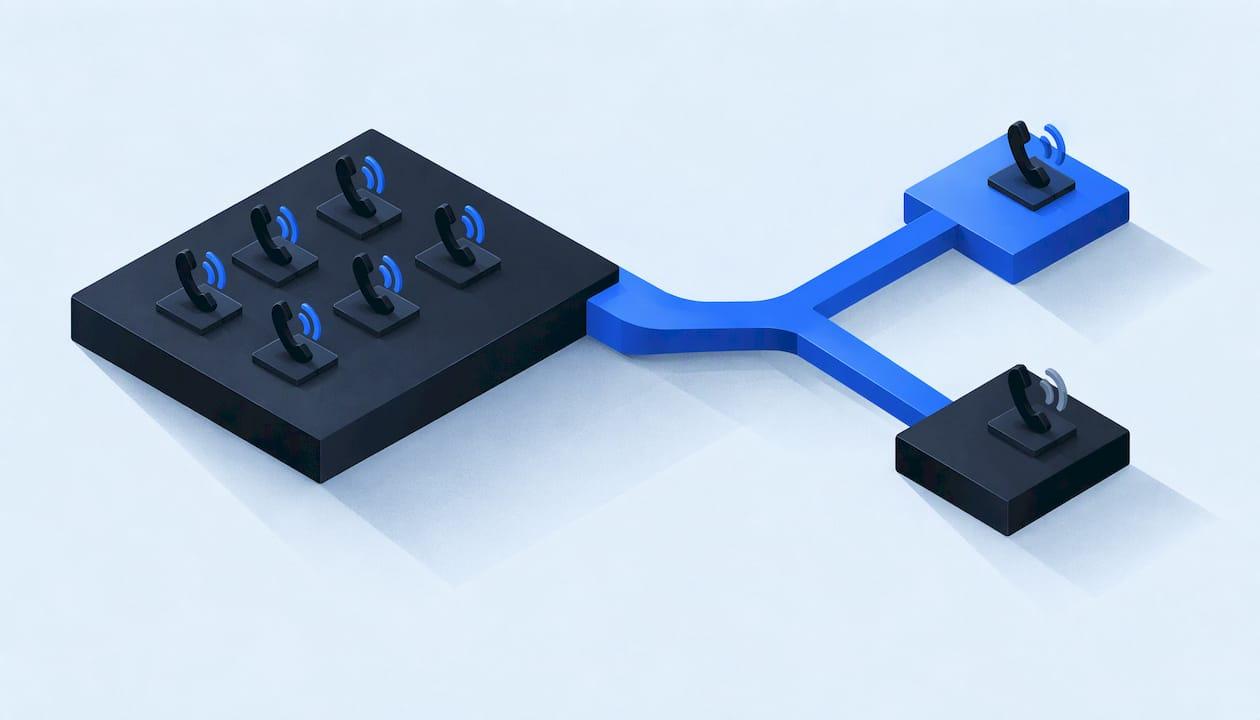
An overflow call is a call your main team cannot take right now, so it moves to a backup instead of ringing out. For an HVAC, plumbing, roofing or water damage company, that backup decides whether a caller with a burst pipe becomes a job or dials the next company on the list. The best backup is an AI voice agent connected to your calendar, customer records and follow-up, so every overflow call is answered, qualified and logged. That is what we build at Equinox Strategies.
TL;DR
- An overflow call is one that no agent can take, or that hits a queue limit or a maximum wait time, so the phone system sends it to a backup destination.
- Routing is rule-based: a trigger (all lines busy, wait too long, no one available) sends the call to another group, an answering layer or voicemail.
- Answering the call is half the job. The caller's details must also reach your CRM, calendar and dispatch, or the lead is still lost.
- Track abandoned calls, average speed of answer and service level, so you can see whether overflow is working.
- A scoped, documented build with clear data handling keeps the backup reliable and your customer data protected.
Table of Contents
- What an overflow call is and when it happens
- What happens to a call without overflow rules
- How overflow routing works, step by step
- The options for handling call overflow
- What good overflow handling does for a service business
- How to set up overflow call handling
- Measuring whether overflow is working
- Make overflow part of the plan, not a patch
- Our view on overflow
- Put an overflow backup in front of your busiest hours
- FAQ
- Sources
What an overflow call is and when it happens
The term comes from call centers, but the problem is the same in a six-person plumbing shop. According to Zendesk's documentation, an overflow call is one that cannot currently be taken by any agent or answered by voicemail. It happens when all agents are offline, decline or miss the call, or when the maximum queue wait time or queue size is reached.
Call Centre Helper describes it as unanswered calls being moved from one target group to another because the original group is at or near its capacity. The phone system uses a trigger, often a maximum queue-time threshold, to decide when a call should overflow. The destination can be an automated answering service, another department or an outside team.
For a service business, the moments are predictable:
- Weather events. A hailstorm, a freeze or a flood sends a week of calls into one morning.
- Peak season. The first heat wave for HVAC, the first cold snap for heating repair.
- Dispatch rush. Your office staff are on the line with one customer while three more ring.
- Lunch, breaks and sick days. Short gaps that line up with the busiest part of the day.
- Marketing spikes. A campaign or a Google listing that suddenly performs.
What these have in common is that the caller has a problem now. A person with water on the floor does not leave a message and wait. They call someone else.
What happens to a call without overflow rules
Without a rule, the outcome is left to chance. EaseDial's guide explains that when a queue is full, a caller waits too long or no agent is free, calls may be dropped or left ringing indefinitely unless overflow rules say otherwise.
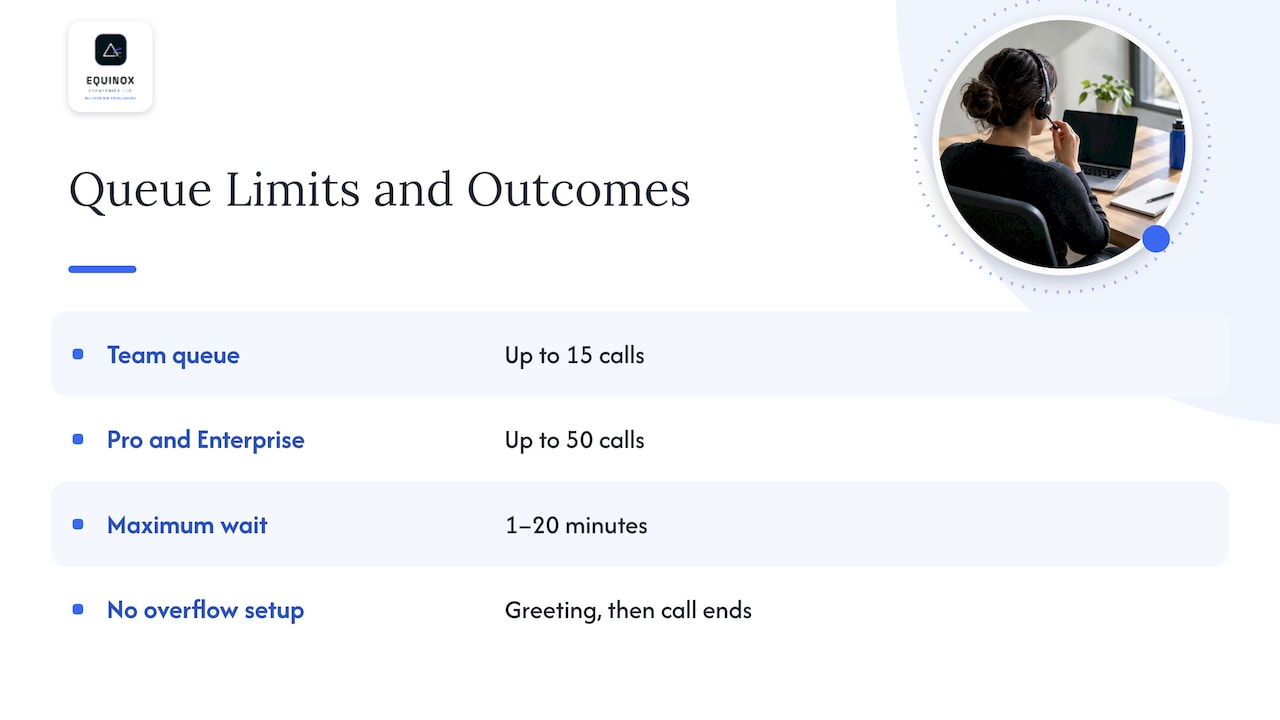
The limits are lower than most owners expect. In Zendesk Talk, per eesel AI's guide, a queue holds at most 15 calls on the Team plan and 50 on Professional and Enterprise, and maximum wait time runs from 1 to 20 minutes. Past those limits, callers go to voicemail or an overflow number. If voicemail is off and no overflow number is set, the caller hears a greeting and the call ends. Every phone platform has its own limits, so find out what yours does when the line is full. Many owners have never checked.
How overflow routing works, step by step
The path of a call is simple once you see it laid out.
- The call arrives on your main number and goes to your primary group: the front desk, a call queue, or a ring group of dispatchers.
- A trigger fires. Typical triggers are every member busy, nobody available, queue full, or a call waiting past the maximum wait time.
- The system picks the next destination. RingCentral's documentation says that when all primary queue members are busy or unavailable, up to three overflow queues are tried in sequence, rechecking the primary members between groups. Callers wait until answered or until the maximum wait time is reached.
- The backup answers. It may be a second team, an answering layer, an AI voice agent or voicemail.
- The information moves on. The caller's name, address, problem and urgency need to land where your team will act on them.
The design choice that matters most is step 4. A second queue of the same overworked people only moves the pile. A backup that has capacity when you do not is what turns overflow into booked work.
The options for handling call overflow
Businesses generally pick from four approaches.
| Approach | Strength | Where it gets stretched |
|---|---|---|
| Voicemail | Costs nothing to set up | Callers with urgent jobs rarely leave a message |
| Internal backup team (office manager, techs, owner) | Knows the business | Pulls people from billable or dispatch work, fails in the same spikes |
| Human answering service | Live voice, flexible hours | Staff need your scripts, pricing rules and service area, and information often arrives as an email or text to re-key |
| AI voice agent tied into your systems | Answers every call at once, qualifies, books and follows up | Needs to be built around your workflow and data |
Our view is that the last option is where overflow handling is heading for service businesses, because it does not run out of capacity during a spike. It also writes to the same records your team already uses, so nothing is retyped.
What good overflow handling does for a service business
A backup that only says "we'll call you back" is better than a busy signal, but a good one does more on the call itself.
- Greets in your company's name and sounds like part of the office, not a generic line.
- Qualifies the inquiry: what is the problem, where is the property, is it an emergency, is the caller a new or existing customer.
- Books or proposes a time against your real calendar, instead of promising a callback.
- Escalates true emergencies to a live person using your rules. Our call transfer strategy guide covers warm, cold and live-agent handoffs.
- Sends the details to your CRM with a transcript and the lead source, so follow-up starts immediately.
- Triggers follow-up by text or email if the caller drops off or the job is not booked.
If you handle after-hours calls separately, the same logic applies. We wrote about it in after hours answering for SMBs, and about the daytime version in high call volume for service businesses.
How to set up overflow call handling
1. Find where your calls are lost today
Pull a week or two of call logs from your phone system. Note the hours when calls go unanswered or reach voicemail, and compare them with your busiest booking times. Most owners find the gaps cluster in a few windows: first thing in the morning, lunch, and right after a storm or a heat wave.
2. Define your triggers
Decide when a call should leave the primary group. Common rules are all lines busy, a set number of rings, a maximum wait time, or the number of callers already in the queue. Keep the wait short. A caller with an emergency will not hold for several minutes, so the trigger should fire in seconds, not minutes.
3. Choose the destination and write its rules
Write down what the backup must collect and do: service area, which jobs you take, which are emergencies, who gets a live transfer, what the caller is told about timing. Written rules are what make the backup consistent from the first call to the thousandth.
4. Connect it to your systems
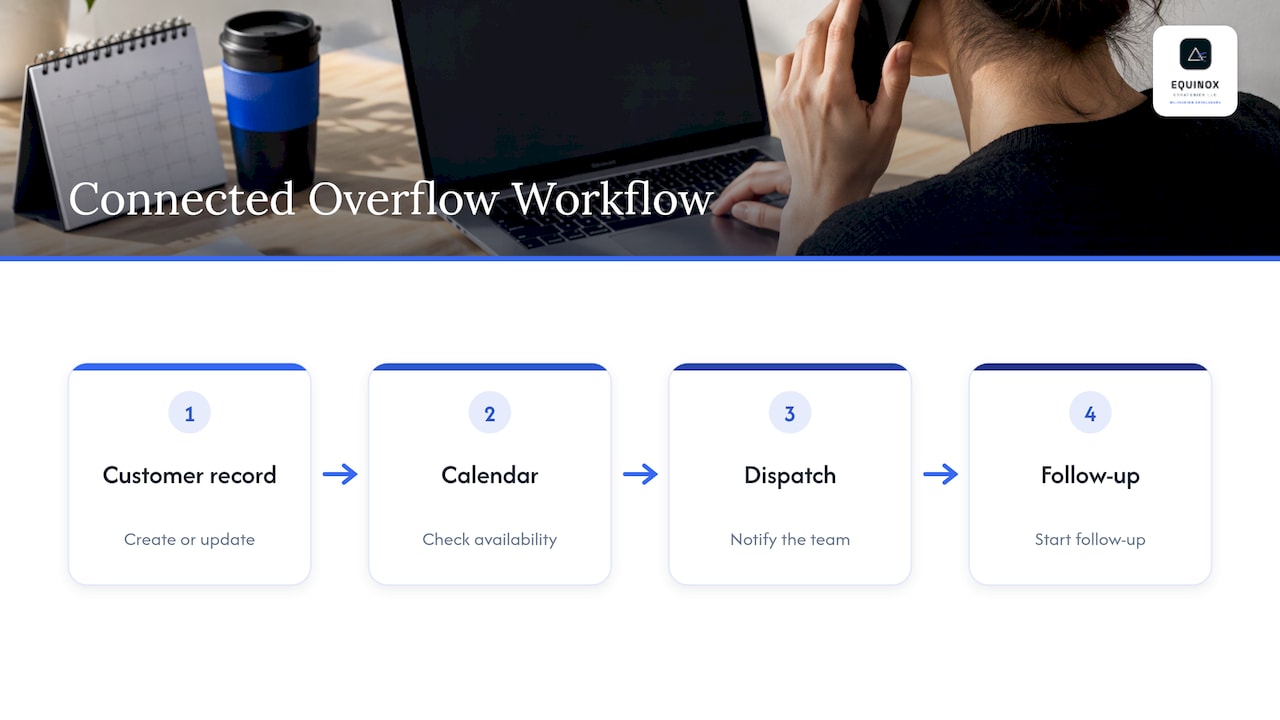
This is the step most setups skip. The overflow destination should create or update a customer record, check the calendar, notify dispatch and start follow-up. When these live in separate tools, someone retypes the details, and that is where leads go missing. We build this as one integrated workflow with unified customer records, calendars and reporting. Lead assignment rules matter here too, and our guide on round robin lead assignment shows how to test them before they go live.
5. Handle voicemail and callbacks deliberately
Some callers will still leave a message. Make sure it is transcribed and entered as a lead, not left in a mailbox. Our voicemail transcription routes walk through the options from setup to lead tracking.
6. Plan the human side
Overflow does not replace your team's escalation path. Set who takes emergencies and when. Our on-call rotation setup guide covers how to build that schedule.
7. Test, then measure
Place test calls that trigger each rule: all lines busy, no answer, after-hours, an emergency. Confirm the record appears, the calendar updates and the right person is alerted. Then watch the numbers below.
Measuring whether overflow is working
You do not need a call center's dashboard, but you do need a few figures. The Wharton and Columbia call-center tutorial explains the standard ones:
- Offered calls versus handled calls: how many rang in and how many were answered.
- Abandonment rate: the share of callers who hang up before being served, an important congestion measure.
- Average speed of answer (ASA): how long callers wait on average, not counting the wait of those who abandoned.
- Service level: the fraction of calls answered within a target, typically 20 or 30 seconds.
The U.S. Government Accountability Office notes in its report on call center management that leaders choose the indicators most meaningful to them, such as the percentage of abandoned calls and average time in queue. For a service business, add two of your own: calls turned into booked jobs, and time from call to first follow-up. Our call center KPIs guide goes through which metrics matter for service companies.
A worked example of how to read them: if 200 calls came in last month and 150 were answered, 50 calls went to voicemail or were dropped. Those 50 are your overflow volume. Multiply them by your close rate and average job value and you have the revenue sitting in that gap.
Make overflow part of the plan, not a patch
Call Centre Helper's Jonty Pearce notes that overflow capacity can be deployed deliberately, and that it is most cost-effective when short high-traffic periods are expected. Regular overflow is also a signal about scheduling, for example breaks and training landing at the same time. Service businesses can use both ideas: a standing backup that is always on, and a schedule that keeps your front desk covered at the known peaks.
Our view on overflow
Most overflow setups fail at the handoff, not at the answer. A call gets picked up, the details go into a text message or a notes app, and by the time someone sees them the customer has booked a competitor.
We build the whole path as one system: voice answering, inquiry qualification, automated follow-up, and unified records, calendars and reporting. Every project is scoped and documented before it starts, with least-privilege access, a written data map, explicit consent flows and a rollback plan, so you know exactly what the automation touches and how to undo it.
One accountable technical lead owns the build. You get the code and the process in the open, with checkable proof that it works rather than promises.
If calls spill over for a few hours a week, that is a sign the backup deserves the same care as the front desk.
Felix
Put an overflow backup in front of your busiest hours
If your phones ring out during storms, heat waves, dispatch rushes or after hours, we can scope an AI voice and messaging agent that answers overflow calls, qualifies the job, books against your calendar and starts follow-up. It connects to your CRM and operations so nothing has to be retyped. We also build custom software when standard platforms cannot match how your business runs.

See our lead generation, voice agents and automation services, or start from the Equinox Strategies site and tell us where your calls are getting lost.
FAQ
What is the difference between overflow and after-hours call handling?
Overflow is triggered by capacity: your team is busy or the queue is full during business hours. After-hours handling is triggered by the clock. Most service businesses need both, and one system can cover them with different rules for each.
Can overflow calls go to voicemail?
Yes, and it is a common default. A voicemail is only useful, though, if it is transcribed and entered as a lead right away. Otherwise it waits in a mailbox while the caller moves on to another company.
How long should a caller wait before the call overflows?
There is no universal number. Platforms let you set a maximum wait time, in Zendesk Talk anywhere from 1 to 20 minutes on standard plans. For urgent trades like plumbing or water damage, set the trigger to fire after a few rings, so the backup picks up quickly.
Which calls should overflow to a live person instead of an AI agent?
True emergencies and high-value inquiries, based on rules you define. The agent qualifies the call, then transfers it to your on-call person while the details are already in your CRM. Our call transfer guide explains the handoff types.
What should I track after I set up overflow?
Start with abandonment rate, average speed of answer and service level, then add booked jobs per overflow call. Review them weekly through the first busy season and adjust triggers and scripts from the results.
Sources
- Managing overflow calls and after-hours call routing, Zendesk
- What is Overflow? Call Centre Helper
- What Is Call Queue Overflow? EaseDial
- Intro to the RingCentral call queue overflow feature
- How to prepare support for higher call volume, eesel AI
- Telephone Call Centers: a Tutorial and Literature Review
- Customer Service: Human Capital Management at Selected Call Centers, U.S. GAO