
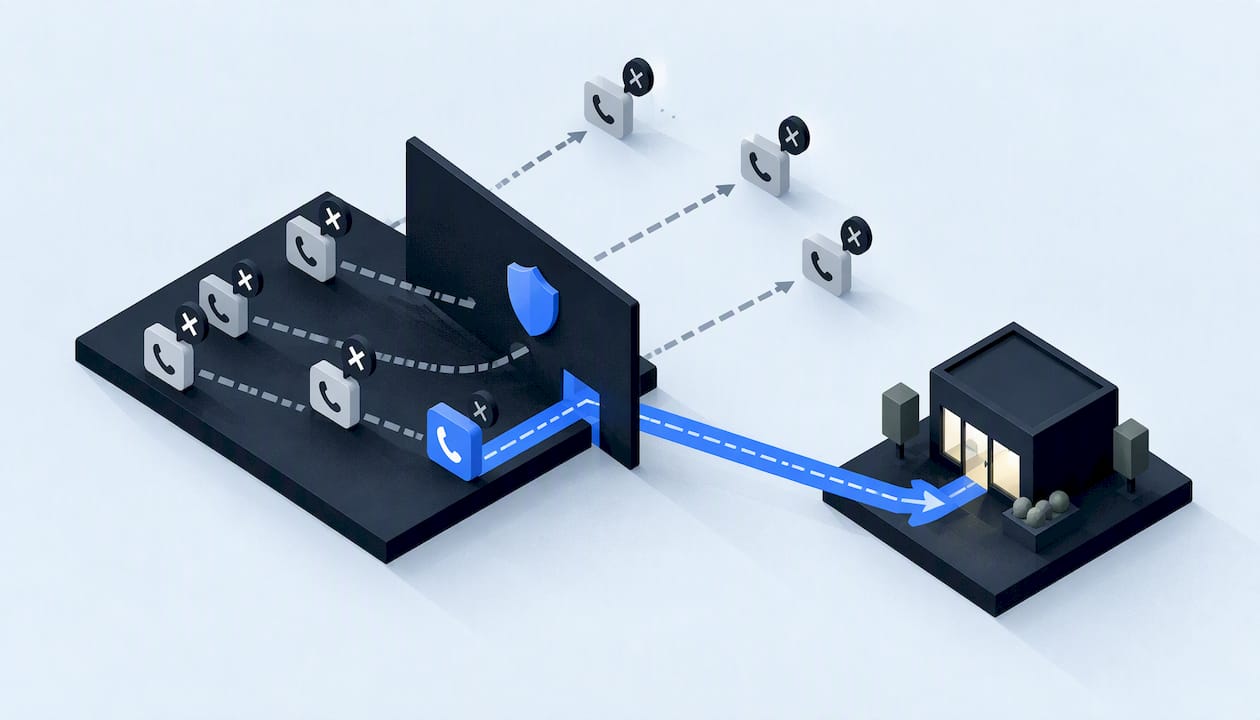
The best spam call filtering setup for a service business is layered and lead-safe. Label suspected spam instead of blocking it outright, auto-block only what is clearly fraud, and review the call log every week. That way the robocalls stop eating your front desk's day, and the homeowner with a flooded basement still gets through.
This guide covers what the filters do, where each one lives (carrier, phone, business phone system), how false positives happen, and how to keep your own outbound calls from being flagged. It is written for HVAC, plumbing, roofing, restoration, and contracting teams where one missed call can be a four-figure job.
TL;DR
- Filtering comes in three forms: blocking, labeling, and routing unknown callers. Labeling is safer for a business that lives on inbound leads.
- Carriers, phone settings, third-party apps, and business phone systems all offer tools. Most let you opt out of automatic blocking.
- False positives are real: blocked calls may go to voicemail, ring once, or give no notice at all. Review your call log weekly.
- The National Do Not Call Registry is for personal numbers, so it will not stop business-line calls.
- If your own outbound calls get flagged, check your numbers against complaint databases and analytics companies, and keep calling patterns normal.
Table of Contents
- What spam call filtering actually does
- Where to filter: carrier, phone, and business phone system
- The real risk: false positives
- A lead-safe setup, step by step
- Missed calls and voicemails still need follow-up
- When your own calls get flagged as spam
- Do codes like #662# or 77 block spam?
- What the Do Not Call Registry does and does not do
- Reporting floods and persistent spoofing
- Our perspective
- Let us handle the call flow
- FAQ
- Sources
What spam call filtering actually does
People use "block," "filter," "screen," and "label" as if they were one thing. They are not, and the difference matters when every ring could be revenue.
Blocking stops the call before your phone rings. The FCC says blocked calls may go to voicemail, produce a single ring with caller ID information, or give no notice at all. That last case is the dangerous one for a business: you never know a customer tried.
Labeling lets the call ring through with a warning such as "Suspected spam." Your team decides whether to answer. The FCC notes that some services label calls and that customers can opt out of automatic blocking.
Screening asks the caller to identify themselves, or routes unknown numbers to a different path (voicemail, a receptionist, an automated intake) before a person picks up.
The FTC reports that all major U.S. voice service providers offer call-blocking or filtering products to some or all customers. It also says spoofing and automated dialing make illegal callers harder to find and deter. In practice, no single filter catches everything, so you stack a few.
Where to filter: carrier, phone, and business phone system
Carrier-level tools
Carriers sit closest to the network, so their tools catch the most before a call ever reaches you. The rules behind them matter: the FCC has said voice providers may offer call-blocking programs on an opt-out basis, as long as they give clear, plain-language disclosure of how blocking is determined and the risk of blocking wanted calls.
That risk disclosure is worth reading. Ask your provider:
- Does the service block, label, or both?
- Is it on by default for business lines, or only for consumer plans?
- Can I opt out, or set it to label only?
- Where can I see what was blocked?
One example of a lead-preserving design is AT&T's small-business digital phone feature. Its Call Protect for AT&T Phone for Business lets suspected spam through with a warning, can automatically block suspected fraud, lets you unblock numbers, and keeps a call log you can review and report from. That split, warn on the gray area and block only the clear fraud, is the model to look for on any carrier.
Phone settings and apps
If your techs and office staff use cell phones, the built-in settings are the quickest win. Both major mobile operating systems let you silence or filter unknown callers and mark numbers as spam. Apple's guidance on managing unknown callers and Google's Phone app caller ID and spam settings both work this way: filtered calls skip your notifications but appear in your call history.
That last detail is the catch. On an owner's personal phone, a filtered call does not buzz and does not leave a missed-call alert. If that phone is also where customers reach you, turn the hard filter off and use labeling instead.
The FCC also lists third-party services and apps as options, along with blocking specific numbers from your phone's settings. Use number blocking for recurring offenders, not as your main defense.
Business phone systems
A cloud phone system or VoIP line gives you the most control, because you can build rules around how a call is handled, not just whether it connects. Useful features to look for:
- Spam labeling on the caller ID display, so the person answering sees the warning.
- A blocklist you can edit and an allowlist for vendors, suppliers, and repeat customers.
- Call logs with timestamps so you can audit what was filtered.
- After-hours routing to voicemail or an answering service instead of a ringing office.
That last point connects to a bigger problem than spam: calls you never answer. If you want the numbers on that, our guide to after-hours answering for small businesses covers how much inbound demand ends up in voicemail.
The real risk: false positives
Filtering is a trade. Every filter that stops more junk also has some chance of stopping a real caller. The FCC says false-positive blocking may occur when a legitimate caller's calling patterns resemble patterns associated with unwanted or illegal robocalls.
For a service business this shows up in specific ways:
- A homeowner calls from a new or prepaid number, and it gets labeled "Scam Likely."
- An insurance adjuster or property manager calling from a call center gets sent to voicemail.
- A customer using a free internet-calling app is flagged because those numbers get abused.
- A local call that looks like a neighbor spoof (same area code and prefix as your own line) is blocked.
The FTC's own staff has said providers should isolate and block calls that spoof a subscriber's number while allowing the subscriber's legitimate calls through. That is the ideal. Real-world filters do not always meet it, which is why a human review step matters.
A simple false-positive check
Once a week, someone should spend ten minutes doing this:
- Open the call log or blocked-call list from your carrier or phone system.
- Scan for local numbers, repeat numbers, and anything with a voicemail attached.
- Call back anything that looks like a possible customer.
- Move trusted numbers to your allowlist and note which filter caught them.
If you find real leads in the blocked list, that is your signal to loosen that tool from "block" to "label."
A lead-safe setup, step by step
Here is the order we would work in for a typical small service company with a main line, a few cell phones, and an office team.
- Ask your carrier what is on. Find out whether blocking or labeling is already running on each line, and what it does with blocked calls.
- Choose label over block for the main line. The FCC confirms customers can opt out of automatic blocking. For a number printed on trucks and ads, a warning label is safer than a silent block.
- Auto-block only clear fraud. If your system separates "suspected spam" from "suspected fraud," block the second and warn on the first.
- Build an allowlist. Add suppliers, referral partners, property managers, and repeat customers.
- Send unknown callers somewhere useful. Route them to a receptionist, an after-hours answering path, or an intake flow that records what they need. Our piece on secure AI voice receptionists and U.S. rules explains how that works.
- Log everything. You cannot fix a false positive you cannot see. Keep a log of blocked and labeled calls.
- Review weekly, adjust monthly. Move numbers between lists and change settings based on what you find.
If your team uses call recording on any of this, check the rules first. We summarized them in our state-by-state call recording guide.
Missed calls and voicemails still need follow-up
Filtering reduces noise, but the calls that remain still need handling. A good system treats every unanswered call as a task, not a note. For example, one sales platform's documentation describes how missed-call details are emailed to the representative, and voicemail details with a listening link go to the person who most recently called that customer. The principle is what counts: someone specific gets notified, with context, quickly.
For a contractor, the same idea looks like this:
- A missed call from an unknown number creates a text-back or a callback task.
- A voicemail is transcribed and sent to whoever owns that customer or territory.
- Repeat callers who hang up get flagged for a human call, because a second attempt usually means urgency.
If you are also measuring which marketing sources produce calls, pair this with call tracking so spam does not pollute your lead counts. For a broader look at how the technology works, this call tracking marketing guide gives a useful overview of tracking numbers and reporting.
When your own calls get flagged as spam
Spam filtering works in both directions. If your estimators, dispatchers, or appointment-reminder system call customers, your outbound numbers can be labeled "Spam Risk" and ignored. That costs you booked jobs.
The FCC's advice for legitimate callers is practical. Use a valid outgoing number, avoid numbers on the Do Not Originate list, and limit calls per minute, particularly outside normal business hours. It also recommends that businesses periodically check their outbound numbers against consumer complaint databases and industry analytics companies to catch reputation problems early.
A monthly routine could be:
- List every number your business calls from, including dispatch, office, and any automation tool.
- Check each against the analytics and complaint sources your carrier or phone provider points you to.
- Look for sudden drops in answer rates, which often precede a visible spam label.
- Spread high-volume outreach so it does not look like a burst dialer.
We go deeper in our caller ID reputation guide, which covers three signals to check before you automate any fixes. If you run contractor marketing and want help with the visibility side, this home services marketing resource covers reputation and lead capture for contractors.
The redress rule that changed in 2026
There is a newer protection for legitimate callers. Under an FCC rule that became effective March 25, 2026, providers must return SIP code 603+ on IP networks when they block calls based on analytics. That gives the caller information they can use to seek redress when a block is an error. FCC policy more broadly pairs analytics-based blocking with a blocking indication and a way to correct mistakes, so if your outbound calls are being blocked, escalate to your carrier with the specific numbers and dates.
Do codes like #662# or *77 block spam?
This is one of the most common questions people ask. The honest answer is that it depends on your carrier. T-Mobile says dialing #662# turns on Scam Block for its customers, and it warns that it may block calls you want. Other carriers use different codes, apps, or account settings, and some do not use codes at all.
So do not dial a code you found in a forum. Check your own carrier's support page, and confirm what the feature does with blocked calls before turning it on for a number customers use.
What the Do Not Call Registry does and does not do
Many owners assume registering their business line will stop sales calls. It will not. The FTC states that the National Do Not Call Registry is for personal phone numbers, and business-to-business calls and faxes are not covered.
That is why technical filtering matters more for a business line than for a household. The registry is still useful for personal cell phones, but it is not your defense for the main company number.
Reporting floods and persistent spoofing
Most spam you can just filter. A flood is different: hundreds of calls in a short span, or someone spoofing your own business number to call others. For that, the FCC runs a Private Entity Robocall and Spoofing Portal open to businesses and other private entities. Submissions may be shared with the FCC, FTC, Department of Justice, state attorneys general, and traceback partners.
When you report, include what the FCC asks for: the dialed number, the caller ID name and number, the date and time, and your contact information. Keep your call logs, because they are your evidence. Also tell your carrier, since they can often act on the specific numbers faster than a regulator can.
For day-to-day recurring offenders, use your phone's settings or an app to block those specific numbers.

Spoofing also creates a trust problem: customers who get a call that appears to come from your number may start doubting real calls from you. Our guide to caller identity verification for service businesses shows how to give customers a way to confirm it is really you.
Our perspective
Most spam call advice is written for households, where the goal is silence. A service business has the opposite problem. Silence is expensive, because the next call might be a burst pipe, a roof leak, or a water-damaged basement.
So we do not start with the filter. We start with a map: which numbers customers call, which numbers you call from, where each call lands, and who is responsible when one is not answered. Then we choose settings that fit that map, with labeling before blocking and logs for everything.
Our builds are scoped and documented, security-led, and delivered by a single accountable technical lead. For call handling, that means least-privilege access to your phone and CRM data, a written data map, explicit consent flows where they apply, and rollback plans so a bad filter rule can be undone fast.
The goal is simple: spam stops reaching your team, real leads always get an answer or a follow-up, and you can check how it works.
Felix
Let us handle the call flow
If your front desk is buried in junk calls while real leads slip through, the fix is usually a workflow problem, not just a setting. Equinox Strategies builds AI voice and messaging agents, automated follow-up, and integrated lead systems for U.S. service businesses. They answer calls, qualify inquiries, and push everything into one customer record and calendar.

If you want to see how an engagement runs from scope to support, look at our process, or start from our main page.
FAQ
How do I stop 30 spam calls a day?
Start with your carrier's blocking or labeling service, then add your phone's built-in spam filter. Block repeat numbers individually and report floods through the FCC's private entity portal. If volume stays high, a business phone system with an editable blocklist and call log gives you more control.
Do spammers know when you block their number?
Not reliably. The FCC says blocked calls may go to voicemail, ring once, or give no notice at all, depending on the service. Spoofed numbers also change often, so blocking one number rarely stops a campaign by itself.
Will spam call filtering block my real customers?
It can. The FCC says false-positive blocking may occur when a legitimate caller's patterns resemble those of unwanted callers. Use labeling instead of hard blocking on your main line, keep an allowlist, and review the call log weekly.
Can I put my business number on the Do Not Call Registry?
No. The registry covers personal numbers, and business-to-business calls are not covered. For a business line, rely on carrier tools, phone-system rules, and reporting.
What should I do if my outbound calls are labeled spam?
Check your numbers against complaint databases and industry analytics companies, use valid caller ID, and limit call volume per minute. If a provider is blocking you in error, contact them with the numbers and dates, using the redress path the FCC's rules require.
Sources
- Call Blocking Tools and Resources, FCC
- FCC order on advanced methods to target and eliminate unlawful robocalls (2019)
- FTC Biennial Report to Congress on the Do Not Call Registry
- Call Protect for AT&T Phone for Business
- FTC staff comment to the FCC on call blocking (2017)
- Federal Register: Advanced Methods To Target and Eliminate Unlawful Robocalls
- FCC transparency and redress guidance (DA 21-772)
- T-Mobile ScamShield
- National Do Not Call Registry, FTC Consumer Information
- FCC Private Entity Robocall and Spoofing Portal
- FCC: Unlawful Communications, Robocalls, Caller ID Spoofing
- Inbound calls documentation, Gong