Automation security means making sure the software that answers your calls, texts your leads and updates your calendar can only touch what it needs, can be stopped quickly, and leaves a record of what it did. For an HVAC, plumbing, roofing or restoration company, that comes down to a few decisions made before launch: what each automation can access, who approves risky actions, and how you undo a mistake. Equinox Strategies builds automations on exactly that basis: scoped, documented and security-led, with least-privilege access, written data maps, explicit consent flows and rollback plans.
TL;DR
- Every automation should get its own narrow access: read-only where it only reads, write access only where it must write.
- Connected tools multiply risk. Each integration, plug-in and AI connector is a third party with a key to your customer data.
- Keep a person in the loop for actions that spend money, delete records or are hard to reverse.
- Log what every automation does, so a bad run can be found, stopped and rolled back.
- Write your incident steps before you need them: who revokes access, who calls customers, who reports.
Table of Contents
- What automation security means for a service business
- Where the risks come from
- The controls that matter most
- Vetting vendors and integrations
- Testing before launch, monitoring after
- If something goes wrong
- Build it secure from the start
- FAQ
- Sources
What automation security means for a service business
An automation is any workflow that runs without someone clicking each step: a voice agent that answers after-hours calls, a form that creates a job in your CRM (the system where customer records live), a text that follows up on an unanswered estimate. Automation security is the set of controls around those workflows: who or what they log in as, which data they can see, what they are allowed to change, and how you notice when they misbehave.
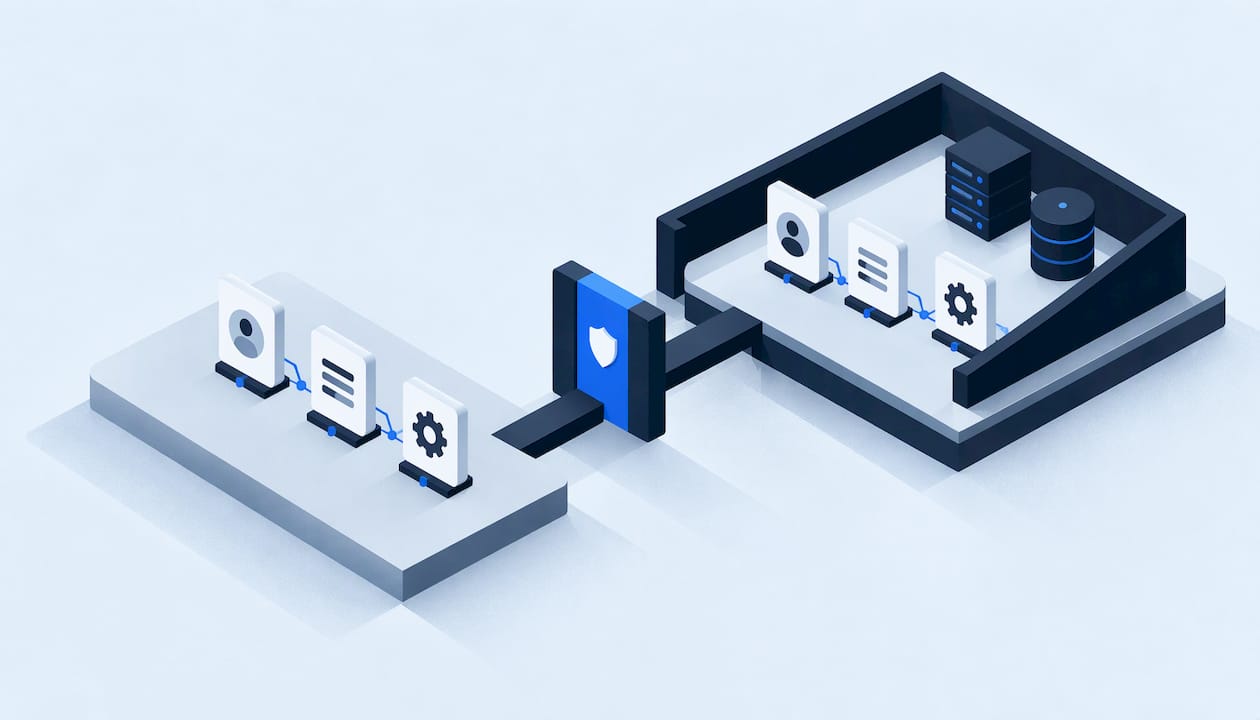
A concrete example of a secure setup: a missed-call text-back workflow that uses its own account, can read the caller's number and write a new lead record, but cannot see invoices, export the customer list or delete anything. Its credentials are stored in a secrets vault rather than in the workflow itself, every run is logged, and a documented switch turns it off. Nothing about it is exotic. It is simply built narrow.
The stakes rise because automations now do more than move data. McKinsey's risk specialists describe the shift from systems that enable interactions to systems that drive transactions that directly affect business outcomes, which raises the stakes for data privacy and system integrity. When an AI voice agent books a job, quotes a window or updates a record, a mistake is no longer a typo. It is a customer experience.
Where the risks come from
Most trouble in small-business automation does not come from a dramatic hack. It comes from ordinary connections left too open.
Integrations that quietly widen access
Each tool you connect adds systems, permissions and vendors to one workflow. Bitsight's analysis of shadow AI notes that connectors can reach internal documents, email, CRM systems and third-party APIs, and that a connector behaves like a privileged third party. It also describes transitive risk: your vendor's vendor now touches your data too. And it warns about vendor sprawl, where nobody can list which tools and permissions exist.
AI tools that can act, not just answer
AWS guidance on securing generative AI tool access explains that letting an AI application call external functions creates new attack surfaces: failures of authentication across integration points, prompt injection (text crafted to trick the AI into misusing a tool), privilege escalation when tools with different permission levels are chained, and compromised tool dependencies. For a front desk, the practical version is a caller or an inbound email that tries to talk your agent into revealing another customer's details.
F5 makes a related point: an assistant that queries a CRM can surface information beyond the requester's access level if retrieval is too broad. The fix is to enforce access rules from the moment someone identifies themselves through to the answer that gets generated.
Speed that magnifies mistakes
Phenom Security's Aaron Smith argues that automated processes run exactly what they are told at machine speed, so wrong logic has a larger and faster blast radius. A person who notices something odd pauses. A workflow does not. That is why guardrails belong inside the workflow rather than being added after launch.
Shadow tools in your own office
The Cyber Readiness Institute recommends inventorying which AI tools employees actually use, finding out whether customer or company data has been pasted into public generative AI tools, and confirming that acceptable-use rules have reached staff. In a busy office, a dispatcher pasting a customer list into a chatbot to draft messages is the most likely leak.
The controls that matter most
The guidance from government and professional bodies converges on a short list. Here it is, translated for a 5 to 50 person service company.
| Control | What it means in practice | Source |
|---|---|---|
| Least privilege | Each automation gets only the access its task needs, read-only versus write set per tool | OWASP AI Agent Security Cheat Sheet |
| Separate identity per agent | A dedicated non-human account for each automation, so one compromise does not open everything | Cyber Readiness Institute |
| Short-lived keys | Expiring credentials instead of permanent ones | Cyber Readiness Institute |
| Human approval | A person signs off on high-impact or irreversible actions | OWASP |
| Treat inputs as untrusted | Messages, emails, retrieved documents and API responses are never obeyed blindly | OWASP |
| Logging | Tamper-resistant records of prompts, tool calls, approvals and violations | ISACA |
Give each automation the smallest possible job
Australia's national cyber agency advises small businesses using AI agents to limit access from the start, review which systems, accounts and data an agent can touch before switching it on, and periodically disable permissions that are no longer needed. It is an Australian publication, but the habit applies anywhere. Write down, per automation, what it reads and what it writes. If you cannot, the access is probably too broad.
Keep secrets out of the workflow
Singapore's data protection regulator and cyber agency, in a joint advisory on insecure APIs, recommend keeping an inventory of APIs that handle personal data (purpose, owner, data types, third-party access), encrypting API traffic with HTTPS/TLS, never storing keys in plaintext or source code, and revoking unneeded credentials promptly. An API is simply the doorway one piece of software uses to talk to another, and every doorway needs a lock and a list.
Put a gate between the AI and anything that acts
ISACA recommends placing agent-accessible tools behind an API gateway or policy-enforcement layer that checks authentication, authorization, request format and rate limits, uses explicit allowlists of domains and commands, and blocks dangerous capabilities such as arbitrary shell access. In plain terms: the AI proposes, a deterministic rule layer decides. The same principle applies to approval steps in any process that changes records or triggers payments, as a practical guide to workflow automation in another field illustrates.
Decide which actions need a human
OWASP advises requiring explicit human approval for high-impact or irreversible actions, binding the approval to the exact action (who, which tool, which target, which parameters, when it expires), and failing closed when approval checks or audit logging break. For a service company, a sensible starting list: issuing refunds, deleting customer records, bulk messaging, changing pricing, and anything involving payment details. The Australian guidance adds that agents should not approve transactions, send communications or modify business data without oversight.
Phenom's list of workflow-level guardrails fits the same pattern: separation of duties so one user cannot both create and approve a high-risk action, step-up approval when something is unusual (an over-threshold payment, an off-hours request), and clear exception paths when validation fails or an API goes down.
Share less data to begin with
Before using an AI tool, the Australian handbook suggests checking the provider's reputation, whether the requested data is truly needed, where and how it is stored and shared, and the privacy policy. It also advises against giving AI tools passwords, financial details or confidential customer information. Data minimization is the cheapest control there is: an agent that never receives a card number cannot leak one.
Vetting vendors and integrations
When you hire someone to build or run automations, you give them access to your systems. CISA's guide to vendor supply-chain risk for small businesses says risk enters whenever you grant physical or logical access to facilities or systems for a contract, and that you should address it before granting that access. It points to a vendor's personnel screening, access controls, monitoring, security training and protection of personal information, and advises due diligence when choosing cloud-hosted solutions.
Turn that into questions you can put to any builder:
- What exact accounts will the automation use, and what can each one do?
- Is there a written map of where customer data goes, including every third-party tool?
- How is consent captured for calls and texts, and where is it stored?
- What is the rollback plan if a release misbehaves?
- Who is the single person accountable for the build, and is the documentation handed to you?
Those are the points we scope into every project. If you are weighing providers, our guide to choosing workflow automation services walks through the wider decision, and the security-first runbooks article shows what written operating procedures look like.
Caller-facing automations add their own checks. Voice agents that collect job details or account information need identity steps, which we cover in caller identity verification and in our piece on secure intake with AI voice receptionists. Outbound calling carries its own legal exposure, covered in the AI outbound calling checklist.
Testing before launch, monitoring after
Test the doorways, not just the happy path. The Singapore advisory recommends testing APIs before deployment, periodically, and after significant changes, using the OWASP API Security Top 10 as the yardstick. For a service business, add scenario tests: a caller who gives a false name, a text reply containing odd instructions, a form submission with an enormous attachment, an integration that times out mid-booking. The workflow should fail safely and visibly.
After launch, watch behavior. The same advisory suggests logging who did what, when, and how much data moved, with alerts for patterns such as unusually high request volumes or repeated access to different customer records. It also recommends rate limits and caps on data retrieval. The Cyber Readiness Institute adds real-time behavior monitoring with anomaly alerts and a central inventory of every agent, which counters shadow tools.
Silent failures are as damaging as breaches: a follow-up that stops sending means lost jobs without any alarm. Our 30-day AI agent monitoring plan lays out what to watch in the first month.

If something goes wrong

Plan the response while things are calm. NIST's small-business primer for its SP 800-171 requirements advises preparing a basic incident response plan in advance, with a business champion, a contact list of response personnel, and a clear idea of what to report, when and how under laws, regulations and contracts. It recommends testing the plan with checklists or tabletop exercises (talking through a scenario as a team). It also notes that many small businesses lack the resources for risk assessment and vulnerability monitoring and should consider a vendor as a risk-management partner.
The first hour usually follows the Singapore advisory's sequence: revoke compromised credentials, suspend suspicious access, investigate the alerts, and assess whether personal data was affected. Then check your notification duties. In the US, those depend on your state and your contracts, so confirm them with your attorney. Our incident response automation playbook is written for field operations teams.
Our view
Most automation vendors sell you a tool and leave the connections to you. That is where the exposure lives: the glue between your phone line, your CRM, your calendar and your messaging.
We build the other way round. Every project is scoped and documented before it runs. Access follows least privilege, the data map is written down, consent flows are explicit, and each release has a rollback plan. One accountable technical lead owns the build, so you know who to call. We would rather show you code and process you can check than ask you to take a promise on trust.
For a service business, that means the lead who calls at 9 p.m. is answered, qualified and followed up, and the system doing it cannot reach more than it should.
Felix
Build it secure from the start
If your leads, calls and follow-ups already run through several disconnected tools, the safest time to tighten them is when they are being joined up. Equinox Strategies delivers lead generation, AI voice and messaging agents, done-for-you automations, the operating layer underneath them, and custom software from client briefs for US service businesses. You can see how engagements run on our process overview or start from the services page.

Tell us which workflows touch customer data today, and we will scope them with the access limits, data maps and rollback plans described above. Start at equinox-strategies.llc.
FAQ
What is the first thing to secure in a business automation?
Start with access. List every automation, the account it uses, and what that account can read and change. Cut anything it does not need. Narrow access limits the damage from nearly every other failure, from a bad prompt to a stolen key.
Do small service businesses really need to worry about AI agent security?
Yes, because the exposure comes from connections, not company size. An agent linked to your CRM, inbox and calendar can reach a lot. CISA's small-business guidance defines these firms as organizations with up to 500 employees and says most have fewer than 100, and it still expects them to manage vendor access deliberately.
Which actions should always need human approval?
Anything destructive, financial or hard to reverse: deleting records, issuing refunds, changing prices, sending bulk messages, handling payment details. ISACA and OWASP both recommend human sign-off for high-impact actions, with step-up authentication for critical ones like payments or privilege changes.
How do I keep customer data out of public AI tools?
Set a written acceptable-use rule, tell staff what may never be pasted in (passwords, payment details, customer lists), and inventory the tools people actually use. Then give staff an approved, properly scoped alternative so they are not tempted to improvise.
Sources
- McKinsey: Agentic AI security risks and governance
- Bitsight: The invisible expansion of the attack surface
- F5: AI Security Beyond the Model
- Phenom Security: Securing business process automation
- Cyber Readiness Institute: Secure Use of Generative AI
- Cyber Readiness Institute: Smarter Automation, Safer Outcomes
- OWASP AI Agent Security Cheat Sheet
- ISACA: Cybersecurity Recommendations for Securing AI Agents
- cyber.gov.au: Using AI securely in your business
- PDPC and CSA: Joint advisory on insecure APIs
- CISA: Operationalizing Vendor Supply Chain Risk Management for SMBs
- NIST SP 800-171 R3 SMB Primer
- Recruitment workflow automation guide