Conversational AI for customer service is software that talks with a customer in plain language, by phone, text or chat, works out what they want, and then answers, books, gathers details or passes the conversation to a person. For an HVAC, plumbing, roofing or restoration company, its best use is not a clever chatbot on the website. It is making sure that every call and message gets a prompt, accurate reply at 2 a.m. or during the lunch rush, and that the result lands in the same records your team already uses. That last part is where most projects succeed or fail, and it is the reason we build these systems as scoped, documented, security-led projects instead of bolt-on tools.
TL;DR
- Conversational AI understands what a customer says and responds in a natural back-and-forth. It is not the same as a phone menu (IVR) or a scripted chatbot.
- For service businesses, the highest-value jobs are answering inbound calls, qualifying the inquiry, booking the visit and following up on leads that went quiet.
- It works only as well as its connection to your calendar, CRM and dispatch, plus a clear rule for when a human takes over.
- In the US, AI-generated voices on calls fall under the Telephone Consumer Protection Act (TCPA), so consent and data handling are design requirements, not afterthoughts.
- Start with one use case, measure it for a month, then expand.
Table of Contents
- What conversational AI actually is
- How it works on a call or a text thread
- Where it earns its keep in a service business
- Handing off to a person without losing the customer
- What the evidence says about results
- Connecting it to the systems you already run
- Compliance and security: what to settle before launch
- How to choose a first use case and measure it
- Our perspective
- How we can help
- FAQ
- Sources
What conversational AI actually is
The term gets used loosely, so here is the practical version. Conversational AI aims to understand human speech and the flow of a conversation, and to respond appropriately to questions it is built to handle. Generative AI, by contrast, creates new content from what it has learned, and can answer out-of-scope questions in unexpected ways. Many production tools combine the two: one part interprets what the caller said, and another composes the reply.
That difference matters to you because of how each behaves under pressure:
| Technology | What it does | Where it fits in a service business |
|---|---|---|
| Phone menu (IVR) | Offers numbered options ("press 2 for service") | Routing only. Callers often give up before reaching an answer |
| Scripted chatbot | Matches keywords to fixed replies | Simple website FAQs |
| Conversational AI | Understands free-form speech or text, keeps context across turns, takes actions | Answering calls, qualifying leads, booking, follow-up |
| Generative AI alone | Writes fluent text on almost any topic | Drafting and summarizing, with guardrails when facing customers |
A caller who says "my basement has two inches of water and it's coming from the washing machine line" should not have to choose from a menu. A well-built system recognizes an urgent water-damage inquiry, asks for the address and callback number, and routes it accordingly.
How it works on a call or a text thread
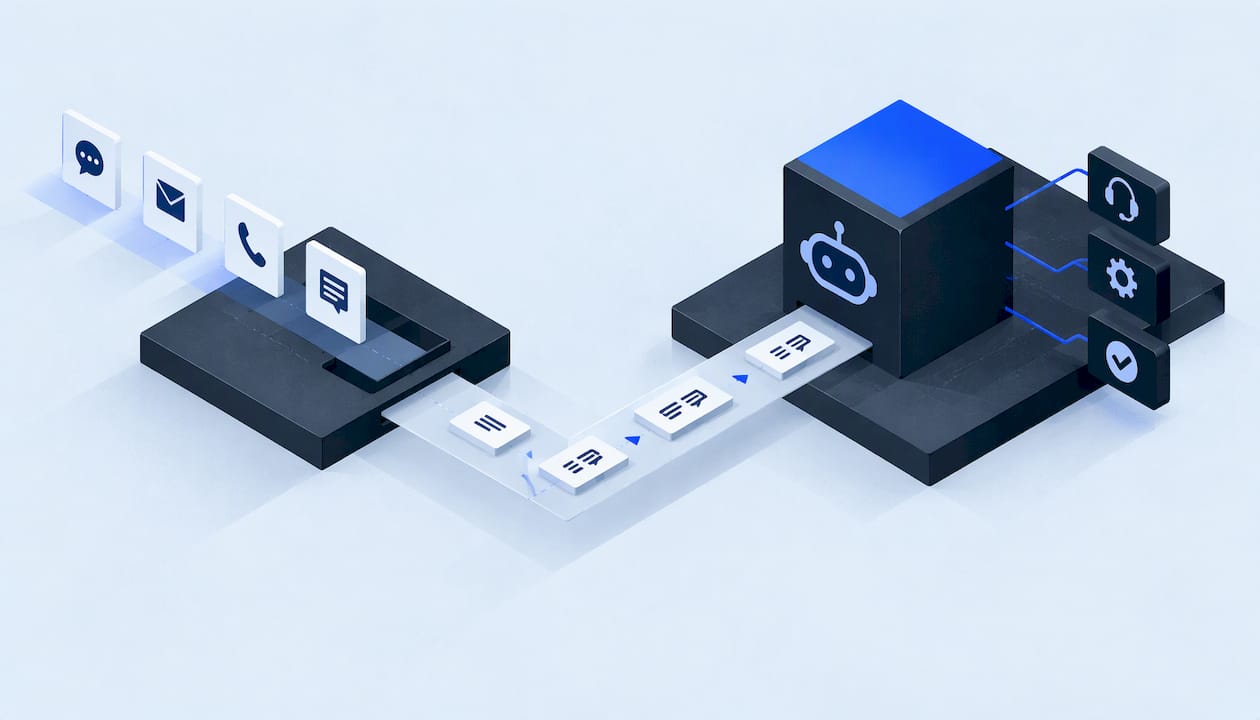
Every exchange runs the same loop. According to Coval's overview of conversational AI, the system takes in typed or spoken input, works out the intent, updates its memory of the conversation, and then decides whether to answer, ask a follow-up, take an action in a business system, or hand off to a person.

Voice adds more steps. The same source describes a chain in which speech is converted to text, a language model with access to tools decides what to do, and the reply is converted back to speech over a live audio stream. Speed matters in that chain: Coval's public benchmark reported a transcription latency of 86 ms for one speech-to-text model and a first-audio latency of 291 ms for one text-to-speech model, as 30-day averages to October 28, 2026. You do not need to memorize these numbers. The takeaway is that natural-feeling voice depends on every link being fast, and that benchmarks change often.
The phrase "take an action in a business system" is the one to focus on. A system that only talks is a novelty. A system that checks the calendar, creates the job record and sends a confirmation text is customer service.
Where it earns its keep in a service business
A contact center for a large retailer and a front desk at a 12-person roofing company have different problems. Yours usually look like this:
- Calls arrive when nobody can answer. Technicians are on roofs, crawl spaces and job sites. The office is busy or closed. Storm days and cold snaps multiply the volume.
- The first responder often wins the job. A homeowner with a failed furnace or a burst pipe calls several companies in a row.
- Leads go cold in the follow-up. Web forms, missed calls and estimate requests need a second and third touch that a busy team forgets.
- Information gets retyped. The voicemail becomes a sticky note, then a spreadsheet row, then a calendar entry, and details drop out at each step.
Conversational AI addresses these in four concrete jobs.
1. Answering and triaging inbound calls
The agent picks up, identifies the type of problem, gathers name, address and callback number, and flags emergencies. Our guide to AI voice agents for service businesses walks through what to expect from voice answering, and our piece on AI voice receptionists and U.S. rules for small firms covers secure intake.
2. Qualifying the inquiry
Not every call is a job you want. Qualification means asking the few questions that decide next steps: Is it residential or commercial? Is it an emergency? Is it inside your service area? Does an insurance claim apply? The answers go into the record, so your estimator starts with context.
3. Booking the visit
When the agent can see your calendar and rules, it can offer real appointment windows instead of promising a callback. We explain the mechanics in AI appointment setting for U.S. service businesses.
4. Following up automatically
A text within minutes of a missed call, a reminder before the visit, a nudge on an unanswered estimate. These are simple, repeatable messages. They are also the ones that disappear first when the office gets busy.
Handing off to a person without losing the customer
The handoff is the most important design decision in the whole system. The agent should not try to hold on to every conversation. It should pass the customer to a person when:
- the customer asks for a human,
- the situation is an emergency or involves safety (gas smell, active flooding, electrical hazards),
- the question is outside what the agent is configured to handle,
- the customer is upset or the conversation is going in circles.
A good handoff also passes along what was already collected, so the customer does not repeat their address and problem. Our call transfer strategy guide compares warm, cold and live-agent handoffs. The principle behind it applies broadly: the AI handles the routine volume so your people can spend their time on the conversations that need judgment. For a wider view of keeping people in charge of the final decision, see this piece on combining AI with human judgment.
What the evidence says about results
Hard numbers for small service companies are scarce, and large-enterprise figures should not be read as promises for a ten-truck shop. The most rigorous recent look we found is a 2025 analysis in the World Journal of Advanced Research and Reviews of more than 25 large-scale deployments of voice agents built on retrieval-augmented generation (the agent looks up answers in a company's own documents). It reports reductions in average handle time of 40 to 60 percent, first-contact resolution improved by up to 30 percent, and break-even typically within 24 months in large call centers.
The same analysis points to what separates strong deployments from weak ones: hybrid collaboration between humans and AI, thorough compliance frameworks, and good orchestration tools. In other words, the technology is only part of the result. How it is scoped, connected and supervised decides the rest.

Connecting it to the systems you already run
This is where fragmented setups hurt. A standalone answering bot that texts you a transcript has solved one problem and created another: now there is a fourth place to check for leads.
A connected setup does the following:
- One customer record. The call, the text thread and the job history attach to the same person, not three separate entries.
- One calendar. The agent books into the real schedule, respecting technician availability, service areas and job types.
- One path for follow-up. Whether a lead came from a call, a form or a missed ring, the same follow-up logic applies.
- One report. You can see how many inquiries came in, how many were answered, how many were booked and how many went quiet.
Call summaries help here too. A short, structured summary attached to the record saves your dispatcher from replaying audio. We describe the approach in AI call summaries: how they work and how to use them.
When your tools cannot be connected the way you need, custom software fills the gap. Part of our work is building software from client briefs when standard platforms cannot match how your operation runs.
Compliance and security: what to settle before launch
This section is not optional reading for US businesses.
Consent and AI voices
In February 2024 the FCC issued a ruling confirming that the TCPA's restrictions on artificial or prerecorded voices cover AI technologies that generate human voices. Calls using those voices require the prior express consent of the person called. In practice, that means outbound calling and texting programs need documented consent flows before they start. Inbound answering is a different situation from outbound campaigns, but the safest habit is the same: record how consent was obtained and make opt-out simple. Our AI outbound calling pilot checklist lays out the pilot steps. For legal questions about your own program, talk to a qualified attorney.
Data handling
A conversational agent hears names, addresses, phone numbers, insurance details and sometimes payment questions. Decide in writing:
- what data the agent collects and why,
- where it is stored and who can see it,
- how long it is kept,
- what the agent must never ask for or repeat.
If the agent will discuss account details, add identity checks first. See our guide to caller identity verification for service businesses.
Risk management
For a general framework, the US National Institute of Standards and Technology publishes its AI Risk Management Framework, including a July 2024 profile specific to generative AI. It is written at a broad level, but its core idea is practical: identify what can go wrong, measure it, and assign someone to manage it.
Monitoring after launch
Agents fail quietly: a calendar connection breaks, a message template stops sending, a handoff number changes. Plan to watch for it from day one. Our 30-day AI agent monitoring plan shows what to check.
How to choose a first use case and measure it
A sensible first project is narrow, visible and easy to measure.
Step 1: Pick the leak. Look at your last month. Where did inquiries get lost: after-hours calls, missed calls during peak hours, web forms nobody answered, estimates nobody chased? Choose one.
Step 2: Write the rules before the prompts. Define what counts as an emergency, which jobs you accept, your service area, your booking windows and when a human must step in. The agent is only as good as these rules.
Step 3: Connect the minimum systems. For a first launch, that usually means your phone line, your calendar and your customer record.
Step 4: Run it with oversight. Review conversations and summaries daily at first. Adjust wording, rules and handoffs.
Step 5: Measure against a baseline. Compare the same metrics before and after. Our call center KPI guide explains the numbers that matter for service businesses. A short list to start with:
| Metric | What it tells you |
|---|---|
| Answer rate | Share of inbound calls and messages that get a response |
| Time to first response | How quickly a new lead hears back |
| Booking rate | Share of inquiries that become scheduled visits |
| Handoff rate | How often the agent passes to a person, and why |
| Follow-up completion | Share of quiet leads that got every planned touch |
Step 6: Expand. Once the first use case is stable, add the next: outbound follow-up, reactivation of old leads, or reminders.
Cost is a fair question at this stage. Pricing for AI receptionists varies widely, and our article on AI receptionist cost for SMBs explains what drives the bill so you can avoid surprises.
Our perspective
Most of the frustration we hear from service business owners is not about whether AI can talk. It is about what happens after it talks. The call is answered, but the details live in a transcript nobody reads. The lead is captured, but the calendar does not know. The follow-up exists, but only in one person's memory.
That is why we treat conversational AI as one part of an operating system for the business, not a standalone gadget. Every build we deliver is scoped and documented. Access follows least privilege, meaning each component can reach only what it needs. We write data maps so you can see where customer information goes, design explicit consent flows, and keep rollback plans so a change can be reversed. One accountable technical lead owns the work from start to finish.
We would rather show you how something works than make big promises about it. A phone agent that books into your real calendar, a follow-up sequence that never forgets, and a record that holds the whole story: those are things you can check for yourself.
Felix
How we can help
If missed calls, slow replies and scattered records sound familiar, our work covers exactly that: lead generation, AI voice and messaging agents, done-for-you automations, and custom software for US service businesses. The agents handle voice answering, inquiry qualification and automated follow-up, and they feed unified customer records, calendars and reporting, so your team works from one picture.

You can see how an engagement is structured on our process section, or start from the services overview.
FAQ
Can AI be used for customer service?
Yes. It can answer calls and messages, collect details, book appointments, send reminders and follow up on leads. It works best on routine, repeatable requests, with a clear path to a person for anything urgent or complex.
What is the difference between conversational AI and a chatbot?
A traditional chatbot matches keywords to fixed replies. Conversational AI interprets free-form language, keeps track of the conversation and can take actions such as checking a calendar. Many modern systems also use generative AI to compose replies, as AWS describes.
Can I use ChatGPT for customer service?
A general-purpose chat tool can draft replies, but a customer-facing service needs more: phone and text connections, access to your calendar and records, consent handling, data safeguards and a handoff to staff. That is the work of a scoped build, which is what we deliver.
Does conversational AI replace my front desk team?
It takes over the repetitive volume, such as first answers, intake questions and follow-up messages, so your team can focus on customers who need a person, on scheduling decisions and on the jobs themselves.
Do I need consent to contact customers with an AI voice?
In the US, the FCC has confirmed that calls using AI-generated voices fall under the TCPA and require prior express consent of the person called. Build consent capture and opt-out into the system from the start, and ask an attorney about your specific program.
Sources
- What is Conversational AI? (AWS)
- What Is Conversational AI? How It Works in Chat and Voice (Coval)
- Agentic Voice AI in Enterprise Call Centers (WJARR, 2025)
- FCC Confirms that TCPA Applies to AI Technologies that Generate Human Voices
- NIST AI Risk Management Framework